
Google is rolling out a major update to its Chrome desktop browser in the US. The change is aimed at ending the “constant game of tab hopping” that often slows down online research and shopping.
The tech giant announced multiple upgrades to AI Mode in Chrome desktop, introducing a comparatively more fluid way to browse, allowing users to interact with websites and AI insights simultaneously.
AI Mode in Chrome brings side-by-side browsing
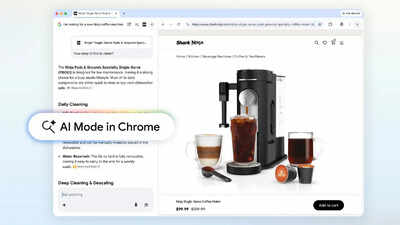
The most significant change is how links interact with Chrome’s AI. Now, when a user clicks a link within AI Mode, the webpage opens in a split-screen view next to the AI window.“Our new Search experience in Chrome can change that. Today’s upgrades for AI Mode in Chrome make it easier to access and engage with content and dive deeper into what you find — all without losing your place or needing to switch tabs.
It’s a more fluid way to discover and learn from the vast range of perspectives across the web,” the company said.This layout allows users to compare details without switching back and forth between tabs, ask follow-up questions about a specific page in real-time, and stay focused on a single task while diving deeper into search results.For example, a user shopping for a coffee maker can open a retailer’s site and ask the AI, “How easy is this model to clean?” The AI uses the context of that specific page to provide a quick answer.
Search open tabs on Chrome
Google is also introducing a “multi-modal” search feature that lets users pull information from their active browser tabs. By clicking a new “plus” menu in the search box, users can select recent tabs, images, or PDFs to include in their query.“You aren’t limited to one type of input. You can now mix and match multiple tabs, images, or files… and bring that context into your AI Mode searches,” Google stated.This feature is designed to help with complex tasks, such as comparing hiking trails from different websites. The updates are currently live for Chrome desktop users in the United States. Google confirmed plans to expand these features to more global regions in the near future.
| Feature | How it Works |
| Split-Screen View | Clicking a link keeps the AI window open while the website loads next to it. |
| Contextual Questions | Ask questions about the specific website you are currently viewing. |
| Tab Integration | Add open tabs, PDFs, and images directly into your AI search query. |
| Availability | Live now in the U.S. for Chrome desktop and mobile. |